KUOWEIHUD
Installation Guide: F16 Car OBD2 Gauge
Thank you for purchasing the F16 OBD2 Gauge. This guide is designed to help you install your new car gauge quickly, safely, and correctly. Please read through all instructions before beginning the installation to ensure optimal performance and safety.
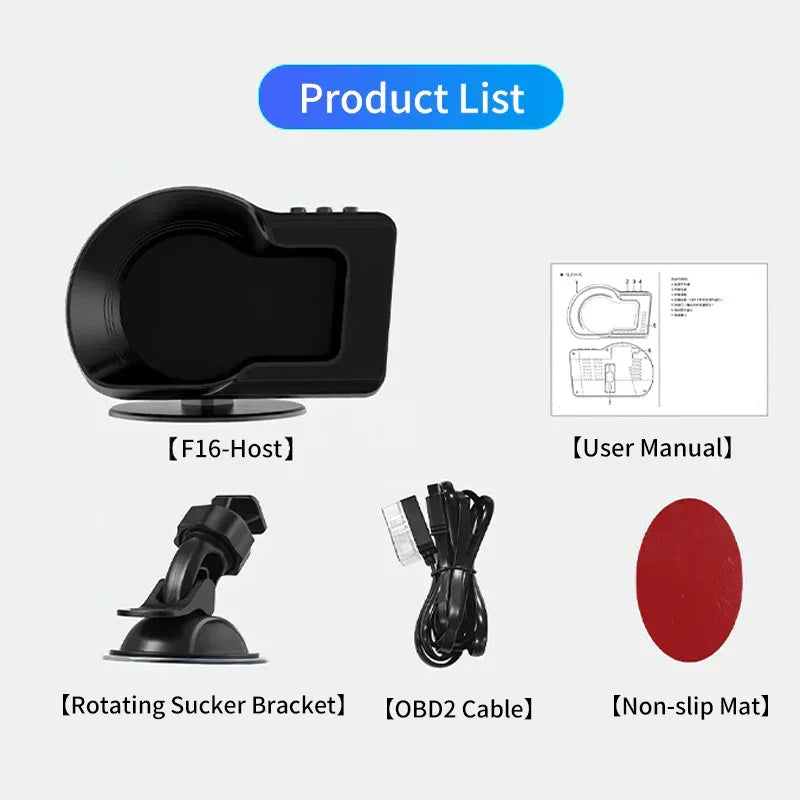
What's in the Box ?
1 x F16 Gauge, 1 x OBD2 Cable, 1 x Double-sided Tape, 1 x Rotating Sucker Bracket, 1 x User Manual

How to Install
1.Noted: At first time use, please ensure your car in idling state (“P” or “N” Gear, Allow the engine to run at idle speed for a few minutes without pressing the accelerator);
2. Connect the cable to your car OBD2 socket, switch on the button, the device will automatically scan your car protocol, it will take about 3 minutes, When screen shows the speed voltage and RPM, the initialization is complete, and it can be used normally;
3. Driving your car on the road, it will read your car real data; Switch off the button, the device will turn off.

How to Switch the Display Interface?
Press Left / Right button to switch the display interface
-

Interface 1
-

Interface 2
-

Interface 3
-

Interface 4
-

Interface 5


System Settings
- Long-press the [ M ] button to enter into the System Settings interface;
- Press Left / Right button to select your desired Function Setting;
- Short-press the [ M ] button to confirm.
- Press Left / Right the button to adjust the value;
- Short-press the [ M ] button to save it.

FAQ
Can I switch between MPH and KM/H?
- Yes. The F16 Car Gauge supports both MPH and KM/H.
You can switch the speed unit in the system settings.
What vehicle is this compatible with?
- The OBD2 Gauge Display is compatible with: 90% of small gasoline cars manufactured after 2008, and your vehicle should have an OBD2 port
- Not Compatible With: All vehicles before 2007, and All diesel/hybrid/electric vehicles
My speed reading is slightly different from my dashboard. Can it be calibrated?
- Yes. The F16 obd2 gauge allows manual speed calibration.
You can adjust the Vehicle Speed Factor in the settings menu to fine-tune the displayed speed for better accuracy.
Can it be mounted on the windshield?
- Yes, the F16 OBD2 Guage Display can be mounted on the windshield.
- It features two installation methods: standing on the dashboard or mounting upside down on the windshield using the included suction cup bracket, which can rotate 360 degrees to adjust the viewing angle and height.
What is the functionality of it?
- It has multiple functions including voltage display, driving direction display, RPM display, time display, water temperature display, etc.
The screen turns on and off, what should I do?
1. Check the OBD2 Connection
Check if the cable is loose? Unplug the cable and plug it back.
2. Check "Voltage" or "Shutdown mode" Settings
Some OBD2 gauges have voltage-related settings that can cause automatic shutdown.
- Look for a "Voltage" or "Shutdown mode" option in the function setting
- Adjust the voltage threshold lower if available — the gauge may be shutting off because it thinks battery voltage is too low
- Adjust the "Shutdown mode", acorrding to your vehicle's specific situation
3. Check Vehicle Battery Voltage
If your battery voltage is low or unstable, the gauge may power on briefly then shut off.
- Start the engine and see if the screen stays on while running — this tests if voltage drops when the starter engages
- If it only happens when the engine is off, your battery may be weak
4. Try a Different Vehicle (if possible)
If you have access to another vehicle, test the gauge there. This helps determine if the issue is with the gauge itself or your car's OBD2 system.
How Long is the cable?
- The power cable is 2M
Ready to Upgrade Your Dashboard in 60 Seconds?
👇 👇 👇 We’ve Got the Fix 👇 👇 👇

KUOWEIHUD
F16 OBD2+GPS Multifunctional Car Gauge for Gasoline Car 2008-2025