


F2 Digital GPS Speedometer with Odometer Clock for Car
F2 Digital GPS Speedometer with Odometer Clock for Car
In stock
Couldn't load pickup availability
Real-Time GPS Speed & Digital Odometer
Track your real-time speed, mileage, driving time, altitude, time & date, and more — without replacing your dashboard.
- Real-time GPS Speed Tracking
- Odometer & Trip Data: Total Odometer, Trip Distance, Driving Time
- Altitude, Compass, Time & Date Display
-
Overspeed Alert & Fatigue Driving Alert — Preset your limit
- USB Plug & Play Installation — No battery required
- Works on Cars, Trucks, and Motorcycles with a 5V USB port
- One-Button Speed Calibration
- Adjustable Brightness — Easy-to-read at Day & Night
- Switchable MPH & KM/H
Specification
Specification
- Item Type: Speedometer
- Brand: KUOWEIHUD
- Product Model: F2
- Material: ABS + PC
- Dimensions: 83.6 x 70 x 69 mm (3.29 x 2.76 x 2.72 in)
- Input Voltage: DC 5V
- Power: Car USB Port
- Speed Unit: KM/H & MPH (switchable)
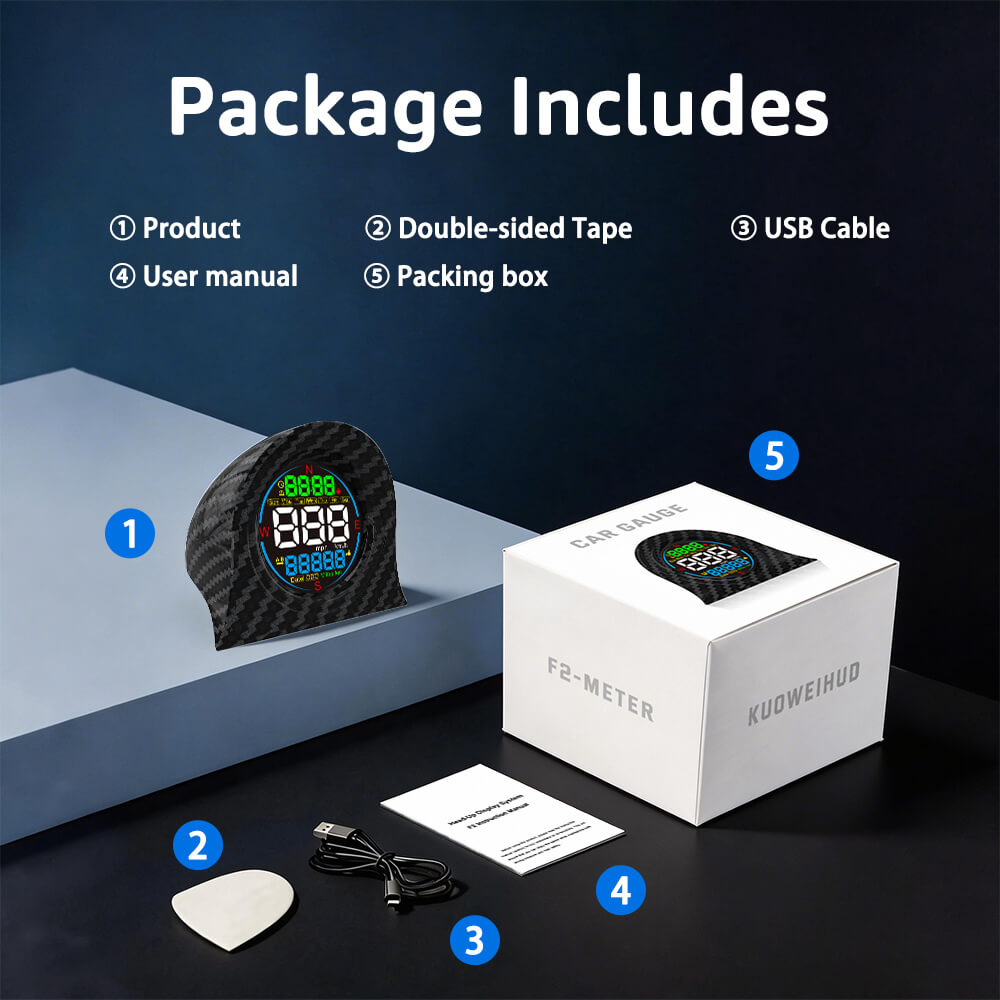
What's in the Box
What's in the Box
- 1 x F2 Speedometer
- 1 x USB Power Cable
- 1 x Double-sided Tape
- 1 x User Manual
Simple 3-Step Installation
Simple 3-Step Installation
- Plug the USB power cable into your vehicle;
- Place speedometer on dashboard;
- Wait for GPS signal → Drive.
Tips:
- Before installation, please drive the car to an open outdoor area with strong GPS signal.
- Use our original OEM power cable for stable regulated voltage; third-party cables may cause startup failure.
Specific installation instructions can refer to Installation Guide: F2 Digital GPS Speedometer




FAQ
📦 Orders & Shipping
- Processing Time: 1-2 Business Days.( No shipments on weekends )
- Delivery Time:
3-7 Business Days from United States Warehouse;
7-15 Business Days from China Warehouse.
Special circumstances may cause delays, please understand
- Track My Order: Once your order ships, you'll receive a tracking number via email. You can use it to track your package at any time.
- Do I have to pay customs or import taxes?
For orders shipped from our US warehouse, no customs fees apply.
For international shipments, customs duties may apply depending on your country's regulations. These are the buyer's responsibility.
↩️ Returns & Refunds
- What is your return policy?
We offer a 30-day return policy. Items must be unused and in original packaging. Please contact us at support@kuoweihud.com to initiate a return.
- My item arrived damaged. What should I do?
Please contact us with 7 days of delivery with photos of the damaged item. We will arrange a replacement or full refund promptly.
📬 Contact & Support
- How can I contact customer support?
You can reach us at support@kuoweihud.com. You can also click the icon in the bottom right corner to contact us online. We respond within 48 Hours.
Upgrade Any Car With F2 GPS Digital Speedometer
Compact Design, Modern Technology Without Replacing Your Dashboard

Drive Safer With Smart Alerts
🚨 Speed Alert: Speed digit will flash when you exceed your preset speed limit.
⏰ Fatigue Driving Reminder: Icon will flash to alert you when it’s time to take a break after long trips (4-hour).
Perfect for Highway Driving, Road Trips & RV Travel, Long-Distance Driving

More Than Just A Speedometer
The F2 digital speedometer displays important driving information in one compact device:
- Current Speed
- Total Mileage / Altitude / Trip Distance / Date ( Optional )
- Compass
- Current Time / Driving Time ( Optional )
- Day of Week

One-button to Switch the Display Mode

Still Struggling To Read Your Speed While Driving?
Many older vehicles were built with traditional dashboards that can be difficult to read quickly.
❌ Small analog speed numbers
❌ No digital speed display
❌ No driving reminders
❌ Limited dashboard information
The KUOWEIHUD F2 GPS Speedometer gives your vehicle a modern digital upgrade without replacing your original dashboard.

Simple 3-Step Installation
- Plug the USB power cable into your vehicle;
- Place speedometer on dashboard;
- Wait for GPS signal → Drive.
Tips:
- Before installation, please drive the car to an open outdoor area with strong GPS signal.
- Use our original OEM power cable for stable regulated voltage; third-party cables may cause startup failure.
- Specific installation instructions can refer to Installation Guide: F2 Digital GPS Speedometer

Perfect for Almost Any Vehicle
Works with Older Cars, Trucks, RVs, Classic Cars , Motorcycles with a USB Port (5V).

What’s in the Box
- 1 x F2 Speedometer
- 1 x USB Power Cable
- 1 x Double-sided Tape
- 1 x User Manual

FAQs
Can I switch MPH and KM/H?
- Yes, The speed unit can be switched between KM/H and MPH
- How to change the speed unit:
- Long-press the button to enter into setting interface;
- Scroll Left/Right the button to adjust it to 1;
- Short-press the button to confirm it;
- Scroll Left/Right the button to adjust the value(0 is MPH, 2 is KM/H).
- Short-press the button to save it; Release your hand, it will automatically back to the main interface.
How to calibrate the time and date?
- Long-press the button to enter into setting interface;
- Scroll Left/Right the button to adjust it to 2;
- Short-press the button to confirm it;
- Scroll Left/Right the button to adjust the value ( According to your local timezone,if your timezone is UTC+5, set it to 05; if your timezone is UTC-5, set it to -05);
- Short-press the button to save it; Release your hand, it will automatically back to the main interface.
How to preset the speed alert limit?
- Long-press the button to enter into setting interface;
- Scroll Left/Right the button to adjust it to 4;
- Short-press the button to confirm it;
- Scroll Left/Right the button to adjust the value ( (Default:150);
- Short-press the button to save it; Release your hand, it will automatically back to the main interface.
How to adjust the screen display brightness?
- Long-press the button to enter into setting interface;
- Scroll Left/Right the button to adjust it to 5;
- Short-press the button to confirm it;
- Scroll Left/Right the button to adjust the value (0 is auto brightness, 1 is the darkest, 2 is middle, 3 is the brightest);
- Short-press the button to save it; Release your hand, it will automatically back to the main interface.
How to calibrate the speed, If the HUD speed is not consistent with the vehicle speed on the dashboard?
- Long-press the button to enter into setting interface;
- Scroll Left/Right the button to adjust it to 6;
- Short-press the button to confirm it;
- Scroll Left/Right the button to adjust the value(Default: 100). For example, If the vehicle speed is 100, the HUD shows 103, you can adjust the value to 97; If the vehicle speed is 100, the HUD shows 97, you can adjust the value to 103;
- Short-press the button to save it; Release your hand, it will automatically back to the main interface.
How to preset the fatigue driving time limit?
- Long-press the button to enter into setting interface;
- Scroll Left/Right the button to adjust it to 7;
- Short-press the button to confirm it;
- Scroll Left/Right the button to adjust the value(Default: 4 hours, there are 0-9 hours for your choice.).
- Short-press the button to save it; Release your hand, it will automatically back to the main interface.